Categories
AI PHP

PHP2Shell: When the patching clock starts before disclosure

PHP2Shell is the name given to two newly disclosed critical vulnerabilities in PHP, CVE-2026-109618 and CVE-2026-109619. Both carry a severity score of 9.2/10 and can potentially allow an attacker to execute code on an affected server without authentication.

Why does this matter? Because the vulnerability sits in PHP itself, not simply in a particular application or plugin. PHP underpins nearly 70% of websites worldwide, business applications, hosting environments and even some vendor products and appliances.

Think of it this way: this isn’t a vulnerability in something attached to the engine. It’s in the engine.

The bigger story is speed

What makes PHP2Shell particularly interesting is what happened before the vulnerability became public.
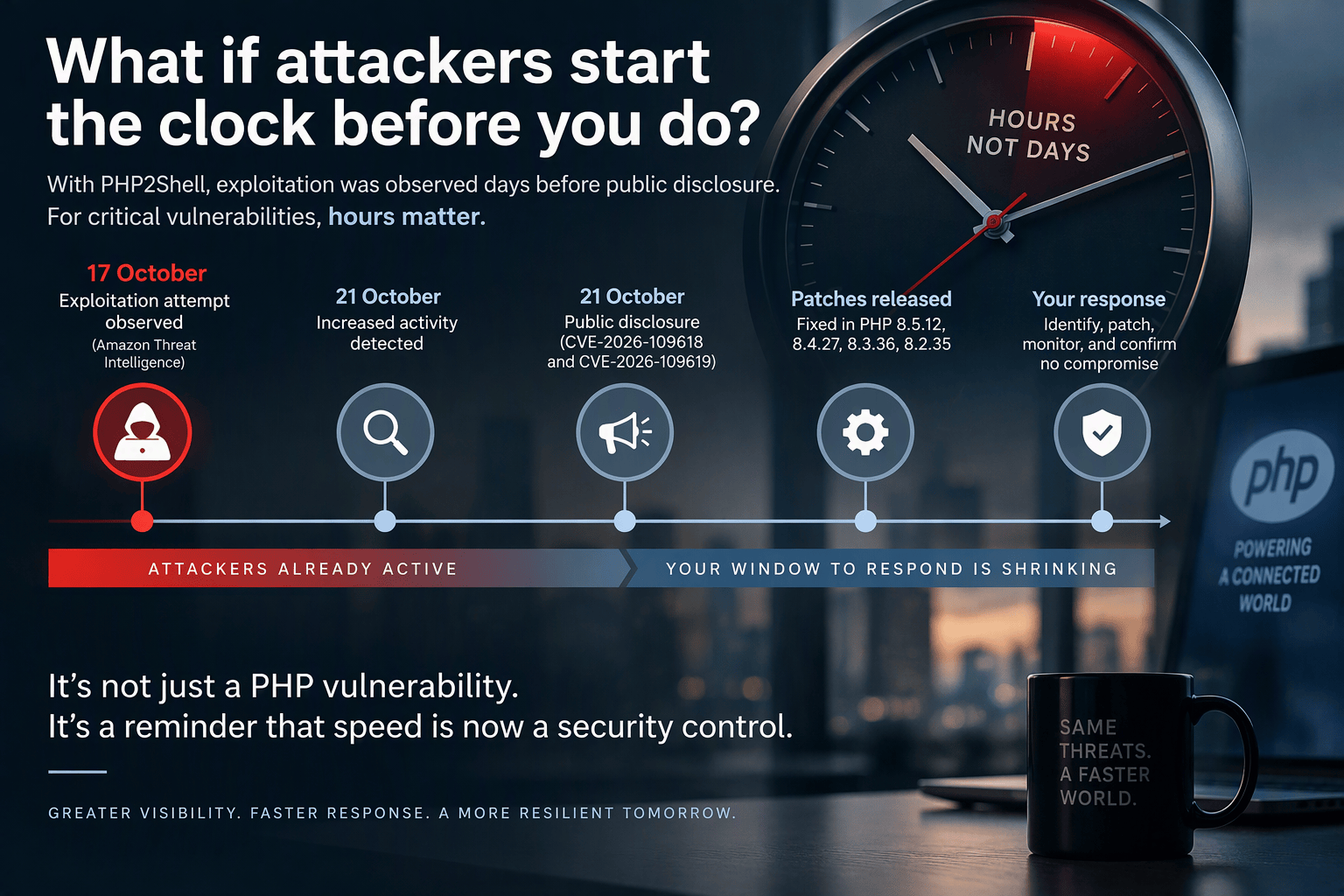
Amazon Threat Intelligence reports that it detected an exploitation attempt on 17 October, four days before public disclosure. After disclosure, additional proof-of-concept exploits appeared within hours and were quickly observed against its sensors.

That challenges a long-standing assumption in vulnerability management: that defenders have a reasonable window between disclosure and exploitation.

Increasingly, they don’t.

Amazon Threat Intelligence also points to AI-assisted vulnerability analysis as one reason this window is shrinking. Turning newly disclosed technical information into a working exploit is becoming faster and accessible to more actors

For critical internet-facing vulnerabilities, days may already be the wrong unit of measurement. Hours matter.

What should organisations do now?

The immediate response is straightforward:

  • Know your exposure. Identify where PHP exists, including less obvious places such as legacy applications, appliances and vendor products. [servicenow.com], [github.com]
  • Prioritise internet-facing systems. Patch supported PHP environments immediately and isolate vulnerable systems that cannot yet be updated. [aws.amazon.com], [servicenow.com]
  • Look backwards, not only forwards. Given the activity observed before disclosure, organisations should check for signs of compromise from at least 17 October, rather than assuming the risk began when the advisory appeared. [aws.amazon.com]
  • Challenge legacy technology. Unsupported runtimes create exposure precisely when organisations have the least time to respond. [tuxcare.com], [github.com]

The leadership takeaway in the AI world

PHP2Shell will be patched. Another critical vulnerability will eventually replace it.

The more important question for CIOs and CISOs is:

If a critical vulnerability emerged tomorrow, could we identify our exposure, determine ownership and act within hours?

If answering that question requires spreadsheets, manual discovery and emails across application teams, the real vulnerability may not be the software.

It may be the operating model around it.

And perhaps that’s the bigger shift AI is creating in cybersecurity: attackers are accelerating, so visibility and response speed increasingly become security controls in their own right.

'Coz sharing is caring
Categories
PHP

Serialized DATA in WordPress

Developers often choose to store specific information in the database like theme options, or settings. Typically this data is serialized in the database so it can be copied or restored easily without compromising the integrity of the information.

ABOUT SERIALIZED DATA

“Serialized data” is just a fancy way of saying “to list data in a specific order”. PHP has a function called serialize() which stores data as a serialized row in the database. For example the “active_plugins” row in wp_options of your database may look like this:

a:8:{i:0;s:31:"query-monitor/query-monitor.php";i:1;s:57:"accesspress-instagram-feed/accesspress-instagram-feed.php";i:2;s:19:"akismet/akismet.php";i:3;s:29:"easy-captcha/easy-captcha.php";i:4;s:43:"google-analytics-dashboard-for-wp/gadwp.php";i:5;s:33:"instagram-feed/instagram-feed.php";i:6;s:19:"jetpack/jetpack.php";i:7;s:47:"really-simple-captcha/really-simple-captcha.php";}

That probably looks like a lot of nonsense, but in reality it’s just taking a list of items and placing it on a single row. The array has a total count of items, each item has a number in the sequence, and each item has a total count of characters.

a:8 = There are 8 items in this array

i:0 = This is item 1 in the array (counting begins with zero)

s:31 = This item has 31 characters

query-monitor/query-monitor.php = The value of the item is located in quotes. The number of characters here should always match the numerical value proceeding it.

You can also break the single line out into multiple lines for easier reading. Just be aware that it must be on a single line if copied back into the database.

$array = array(
'0' => 'query-monitor/query-monitor.php'
'1' => 'accesspress-instagram-feed/accesspress-instagram-feed.php'
'2' => 'akismet/akismet.php'
'3' => 'easy-captcha/easy-captcha.php'
'4' => 'google-analytics-dashboard-for-wp/gadwp.php'
'5' => 'instagram-feed/instagram-feed.php'
'6' => 'jetpack/jetpack.php'
'7' => 'really-simple-captcha/really-simple-captcha.php'
);

POTENTIAL ISSUES

The most common conflict occurs when copying your site to a different environment, as this will change the domain. If your site uses serialized data in a row that contains the domain the character count will no longer match the updated value.

For example, say your site stores serialized data in a row with the URL in it, like this:

a:1:{i:0;s:23:”http://mycooldomain.com”;}

Notice that the value of this item has 23 characters, and is denoted by s:23 in the array.

If copied using one of our Copy Site tools, the URL is search and replaced automatically to the new domain value. That means that the same row on your new environment would end up like this:

a:1:{i:0;s:23:”http://newsite.wpengine.com”;}

But after this change, the value is now 27 characters long meaning s:23 is incorrect. This invalidates the array and the entire row.

So for example, if your theme options stored a full URL path for some settings or an image, it would end up showing default theme settings on the site instead of your custom theme and settings.

If you are performing a basic SQL search/replace on your site, it won’t be able to intelligently update these rows containing serialized data, because it can’t automatically update the character count.

However, if you are performing a search and replace with PHP, this will work for serialized data.

When copying sites, there are a few options to search using PHP, so as to not break the serialized rows:

If you are running into issues with broken serialized data even when using one of the above methods, often times themes or plugins which store important data as serialized rows will offer an export option. With this option, you can export the settings, then import them to the new environment to fix the issue.

'Coz sharing is caring